kratt-cloud

Give every AI agent its own machine. Keep control of all of them.

Claude Code, Codex and Gemini agents run in parallel on isolated Linux VMs with your full stack ready. You set the rules—what they can reach, which secrets they use, what needs your approval—and every action is audited and costed.
kratt-cloud—workspaces
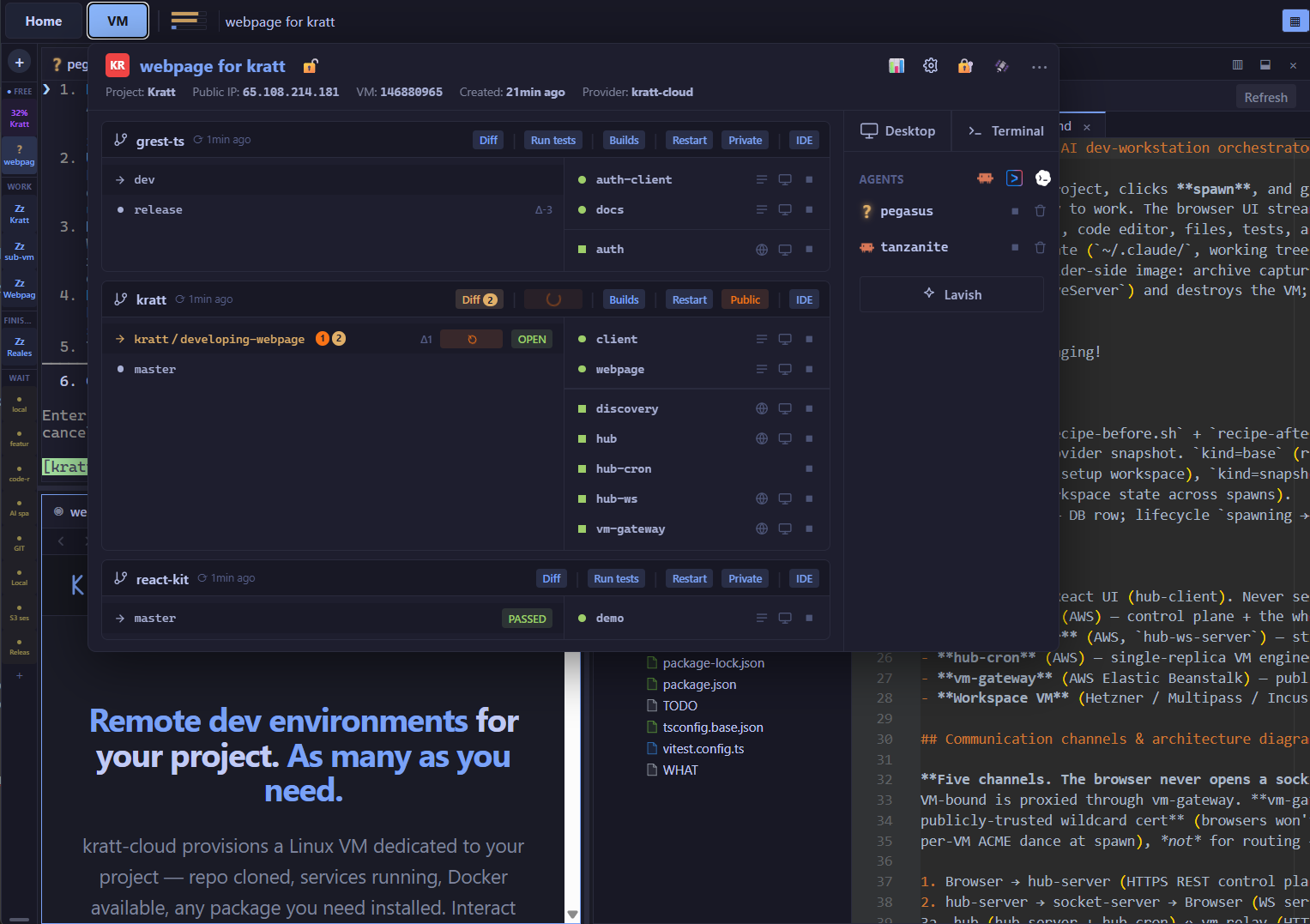
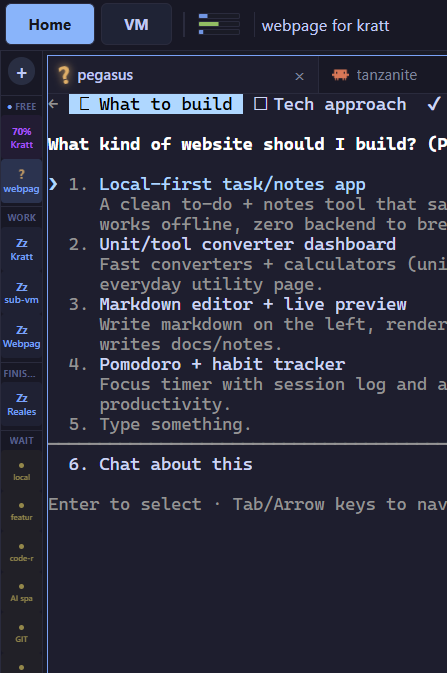
The kratt-cloud workspaces dashboard: a grid of VMs, each on its own branch with live status.
+ Dedicated Linux VM per agent + Owner approvals, fully audited + Egress firewall on every VM + Secrets injected outside the VM + SSO through your OIDC provider + Cost per person and project + Agents that spawn their own helpers + Claude Code, Codex & Gemini + Real-browser tests, fully traced + Docker & any Linux library
Why kratt

Agents that can do real work, inside limits you set

A coding agent is only as useful as the environment it runs in, and only as safe as the boundaries around it. kratt gives each agent a complete machine to work on, and gives you the controls to run many of them with confidence.

Isolated

Every agent works on its own Linux VM with your full stack running: repos, services, Docker, tests. Nothing is shared between tasks, and the blast radius is one machine.

Governed

Approvals for anything sensitive, an egress allowlist on every VM, and secrets that are injected outside the machine. Policy is set by the org and inherited by every workspace.

Visible

Live state for every agent and machine, an append-only audit log, session history, and AI and compute cost broken down per person, project and workspace.

Fits how you work

Claude Code, Codex or Gemini. Changes arrive as normal pull requests with your CI. Sign-in through your identity provider, VMs in kratt's cloud or your own AWS account.

Control

Agents request. You approve. Everything is audited.

Autonomy is only useful when it's bounded. kratt puts three controls around every workspace—an approval for anything sensitive, a firewall on everything outbound, and secrets that the machine can use but never read.

Approvals—one prompt, wherever you are

When an agent needs root, a new host, a secret, a public URL, a release, or a call to an external MCP tool, the request lands in front of the workspace owner with what is being asked and why. Approve from the desktop or your phone; the agent picks up where it stopped.

  • ›Policy decides what asks. Each action has a floor set by the org—ask every time, or ask once and remember for a time window.
  • ›Critical stays critical. A secret marked critical asks on every fetch, whatever the window.
  • ›Scoped and time-boxed. An approval covers one workspace's current run; restarting the VM clears it. Network approvals can also be added to the project's allowlist.
  • ›Audited. Every request, decision and the call it allowed is in the org's audit log.
Needs you 3 pendingbilling-export · Mari
networkReach api.stripe.comagent · claude

"Stripe export integration test needs the Stripe API."

This workspaceWhole projectDeny
secretstripe-test-key criticalrepo api

Test-mode key for the export suite. Injected only into requests to api.stripe.com.

Approve onceDeny
mcpjira · create_issueagent · codex

Calls go out as you—your own Jira sign-in, not a shared bot.

Once2 hours8 hoursDeny

An egress firewall on every VM

Every outbound connection—from the agent, the services it runs, its containers, even root—goes through kratt's egress gateway on the VM, outside the agent's control. Workspaces start strict: an allowlist with the AI providers and your git host, nothing else. Everything that was allowed shows why; everything that was refused shows who tried.

  • ›Templates per org and project. New workspaces copy the policy; child VMs inherit their parent's.
  • ›Dry-run mode. Run in log mode first to see exactly what an allowlist would refuse, then switch it on.
  • ›Closes the usual bypasses. DNS is forced through the policy, raw UDP is dropped, and cloud metadata and private addresses are blocked.
  • ›Automatic for every program. No proxy variables, no per-app setup—a misconfigured app gets no internet, never invisible internet.
  • ›Loosening is audited. A workspace set looser than its template leaves a record.
Network allowlistbilling-export · last 10 min
HostFromWhyConns
api.anthropic.comagentAI provider214
github.comagentgit host37
registry.npmjs.orgagentproject template96
api.stripe.comsvc apiapproved · Mari12
pastebin.comagentrefused1
169.254.169.254containermetadata blocked2

Secret injection—the VM never holds the secret

Agents read whatever is on their machine, so the safest secret is one that is never there. Inside the VM, programs only ever see a placeholder. When a request leaves for the secret's bound host, kratt's injector—running outside the VM—swaps in the real value on the way out. The code works exactly as if it had the key; nobody on the box can read it.

  • ›Root sees placeholders too. Elevated mode can use a binding within policy, but the value itself only exists outside the VM.
  • ›Bound to hosts. A Stripe key is only ever added to requests for the Stripe API, for its own workspace.
  • ›Fails closed. If the injector can't be reached, the request fails with a readable error—there is no fallback that puts the secret on the VM.
  • ›Vault per repo. Values are write-only, encrypted per organization with AWS KMS envelope encryption, and every use is approved and audited.
How a request gets its keySTRIPE_KEY

Inside the VM

Authorization:
Bearer
kratt_ph_7f3a…
→

Injector, outside the VM

policy ✓
approval ✓
host ✓
swap → sk_test_••••
→

api.stripe.com

200 OK
audit:
used by agent
Same model for every credential. Vault secrets, git, AI API keys and subscriptions, AWS and MCP tokens—the VM gets placeholders, the injector holds the values.
Environment-aware agents

Agents that work within your rules

Every agent starts with a map of its machine: which repos are cloned, which services run where, how tests and builds work, what the rules are. kratt gives it tools for all of it—restart a service, run the suite, cut a build, open a PR, publish a site, spawn a helper VM. When a task needs something it doesn't have yet—root, a new network host, a secret, a public URL—it requests it through kratt instead of holding it up front, and continues once you approve.

  • ›Environment-aware from the first prompt—the agent reads its workspace, not a guess at it.
  • ›One toolset across Claude Code, Codex and Gemini—the same tools, the same rules, whichever CLI you use.
  • ›Least privilege by default—root, network access, secrets and publishing are requests you approve, not standing permissions.
  • ›Your skills and plugins, everywhere—org, project and personal skills are installed into every CLI on every VM.
Restart servicesRun testsBuildOpen pull requestsWatch CIPublish sitesStart helper VMsTrack tasksFile issues Request rootRequest network accessRequest a secretMake a service public
agent · billing-export
› Integrate the Stripe export and verify it end to end

● run_tests { repo: "api" }
  ✓ 412 passed · 0 failed · 38s

● curl https://api.stripe.com/v1/charges
  ✗ refused by egress: api.stripe.com not on the allowlist

● egress_request { host: "api.stripe.com",
                 reason: "Stripe export integration test" }
  … waiting for the owner
  ✓ approved by Mari · added to project allowlist

● kratt-secret stripe-test-key
  ✓ placeholder issued - real key added off-VM

● run_tests { repo: "api", path: "export/stripe" }
  ✓ 9 passed

● git_create_pr { branch: "kratt/stripe-export" }
  ✓ PR #214 opened · CI running
Claude kratt connectedvoice · on the go
You

"How are my agents doing on the billing project?"

Claudevia kratt

Three workspaces are running. The Stripe export has PR #214 open with CI green. The invoice-PDF agent has been waiting on you for 20 minutes: it wants access to fonts.googleapis.com.

You

"Approve it for that workspace, and ask the export agent to add a test for refunds."

Claudevia kratt

Done. Both agents are working again. I'll tell you when the refund test is in.

Connect your own assistant

Drive kratt from Claude, ChatGPT or a voice assistant

kratt is also an MCP server. Add it to Claude, ChatGPT or a voice agent, sign in once, and that assistant can see your workspaces, report on progress, start new tasks, prompt running agents and answer their approval requests. Manage a fleet of agents from a conversation, on your phone, without opening a laptop.

  • ›Standard OAuth sign-in. The assistant acts as you, with your permissions and nothing more, after an explicit consent screen.
  • ›Revocable and audited. Every call it makes is in the audit log under your name and the client it came through; disconnect it from your profile at any time.
  • ›Step in when it matters. When an agent is stuck, open the workspace in the browser—terminal, desktop, diff, logs—and take over where it stopped.
Fleet & cost

Parallel agents, with cost per person and project

Large tasks can be split across machines. An agent starts its own helper VMs, hands each a piece, tracks their progress and collects the results—with every machine, agent and cost visible in one place.

Child VMs and orchestration

A lead agent spawns child workspaces on the same project—one to reproduce a bug, one to write the migration, one to run the slow end-to-end suite. It prompts them, checks their state, reads their results, and stops or deletes them when they're done.

  • ›Real machines, not threads. Each child has its own VM, branch and agent, with no shared state.
  • ›Parents only see their own children. The control plane enforces it; there is no VM-to-VM path.
  • ›Guardrails on spend. Live children are capped per parent, children inherit the parent's network policy, and idle machines archive themselves.
  • ›Visible to you. Children show up on your board, so you can step into any of them.
onboarding lead · claude3 children
onboarding · claude · task 3/5working
├─ onboarding-repro · claudetests pass
├─ onboarding-migration · codexPR ready
└─ onboarding-e2e · geminirunning suite

Cost you can explain

Every AI session's token cost and every VM hour, rolled up per day and month. Break it down by person, project, workspace or AI provider, and trace any spike to the session behind it.

  • ›AI and compute together. Token spend per session plus VM hours, priced the way the provider bills them.
  • ›Per person, project and workspace. Drill down to individual sessions.
  • ›Idle VMs archive themselves. A forgotten machine stops costing money; resume brings it back as it was.
StatisticsOctober
Total€1,284
AI€1,047
VMs€237
AI tokensVM hours
PersonProjectAIVM
Maribilling€312€58
Danielonboarding€276€71
Priyainfra€194€39
How the work gets done

From a task to a merged pull request

Five steps on a VM that runs your full stack, with you reviewing the result.

01
02
03
04
05

Environment

One .kratt.json defines it: Docker services, setup commands, dev servers, test runner. Full Linux—any package, any library. The same environment every time.

Interact

AI CLIs are the primary interface. Claude Code, Codex, or Gemini work directly on the VM—editing files, running commands, reading logs. Drop into VS Code when you need to go hands-on.

Verify

The agent runs your full test suite and drives the UI in a real browser. Or open the running app yourself from a public URL—click through it and pin notes on whatever's off.

Review

A diff viewer with file tree, passing checks, and inline comments. See exactly what changed across every file before anything merges—all in the browser.

Merge

A clean PR on a kratt/* branch into your normal review flow. CI runs exactly as it always does—no special handling.

Parallel environments, no contention

Because each environment is an isolated Linux VM, you can run as many as the work demands. One per open task, one for a teammate, one long-running and one quick fix—each with its own machine, branch, and pull request, none stepping on the others.

  • ›One isolated VM per task, with no shared state.
  • ›Live status for every environment—agent working, agent idle, testing UI, PR ready.
  • ›Runs server-side—disconnect and come back to finished work.
Working Testing UI PR ready
workspaces
A column of workspace environments, each on its own branch showing Working, Testing UI, or PR ready.

The agent verifies its own work

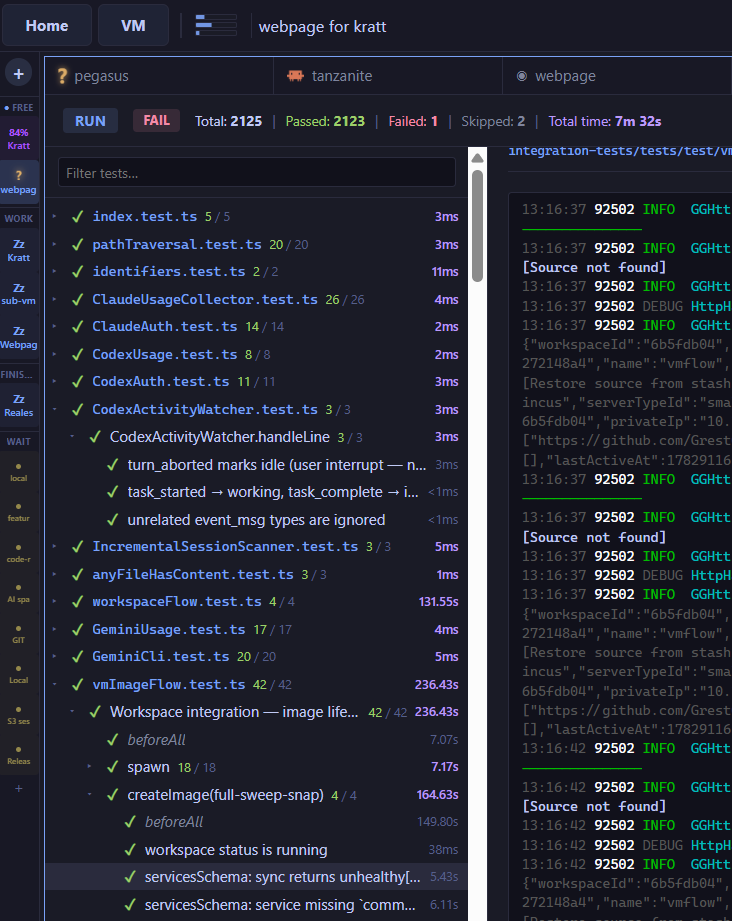
An agent that can't run your code can't check its work. Because this one works on a real machine with your stack running, it runs the full suite and drives the app in a real browser before it hands the change to you. Watch the activity stream, the live terminal, and a healthy-services panel side by side.

  • ›Real test runs—your full suite, on the VM, with results in view.
  • ›Browser verification—the agent clicks through the UI, not just the code.
  • ›Tester annotations on the running app feed straight back to the agent.
test runner · results
The agent's test run: the full suite executing on the VM with pass/fail results in view.

Review every change in the browser

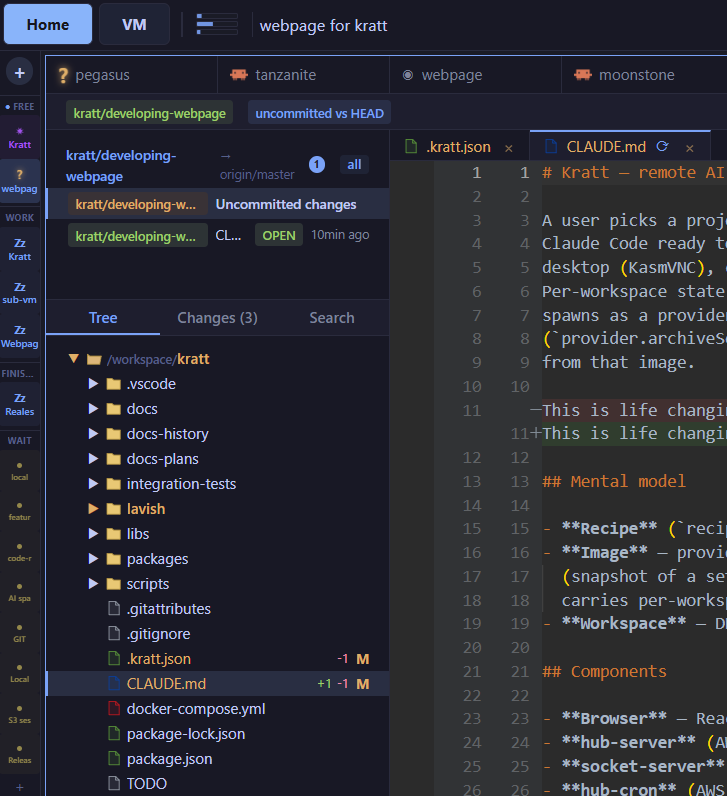
A diff viewer for every change with a file tree, passing checks, and inline comments—before anything merges. No copy-paste, no context switching to read what the agent did.

  • ›File-tree diff with passing checks shown inline.
  • ›Inline comments on any line, right where the change is.
  • ›Select code and tell the agent what to change—highlight the exact lines and describe the fix; it works from your selection, not a vague description.
  • ›Tweak a line yourself and merge—no context switch out of the browser.
diff review
The in-browser diff review tool with file tree, passing checks, and an inline comment.

Test in a real browser—and put it in front of others

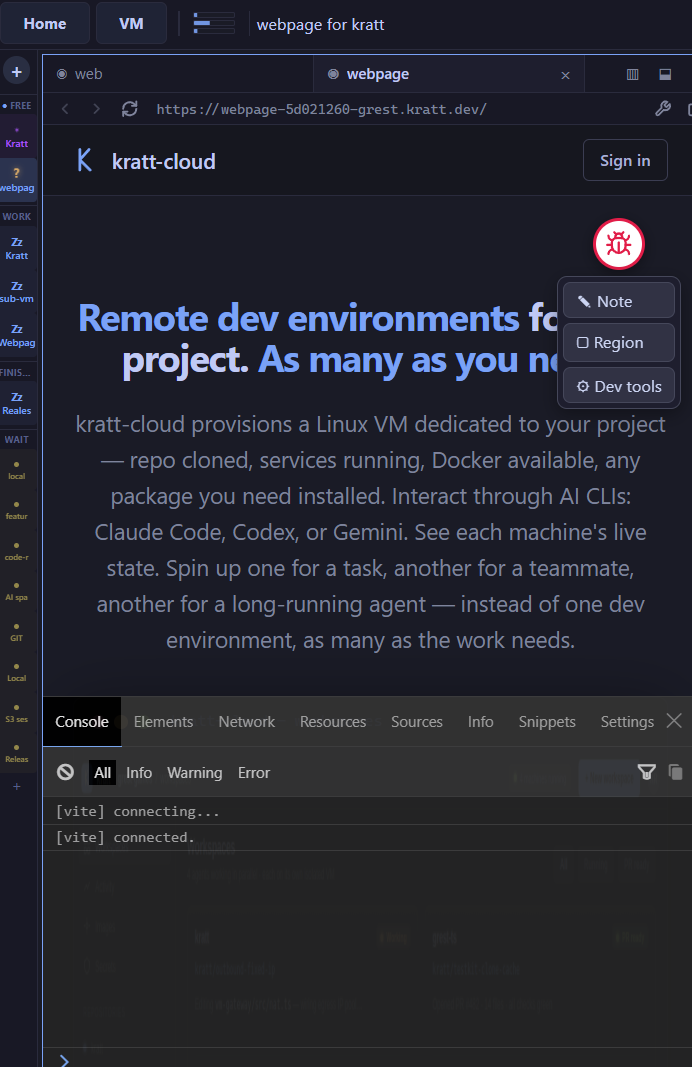
Front-end bugs are hard to hand to an agent: it can't see what you see, and a vague bug report isn't a reproduction. kratt-cloud runs your app in a real Chrome—driven by Playwright—and records the whole session: every console message, network call, navigation, and click. When something fails, the agent already has the logs and the exact steps to reproduce it.

Open the running app from a public URL, try it yourself or send it to a teammate, and pin notes right on the page. Their feedback and their full session come back to the agent as a precise reproduction.

  • ›Driven by Playwright—the agent clicks through a real Chrome, and you can watch it live.
  • ›Full session capture—console, network, navigation, and clicks, recorded as you go.
  • ›Pin notes on the page—point at what's wrong instead of describing it.
  • ›Shareable URL—anyone you send it to can try the app; their session comes back too.
Scoped to your own app. Tracing is built for test sites and only records content served from your workspace. If a page links out to an external site, nothing on that site is captured.
shared app · trace session
A running web app opened from a shared URL, with kratt-cloud's annotation widget, pinned tester notes, and a captured trace session.

Opens a real pull request

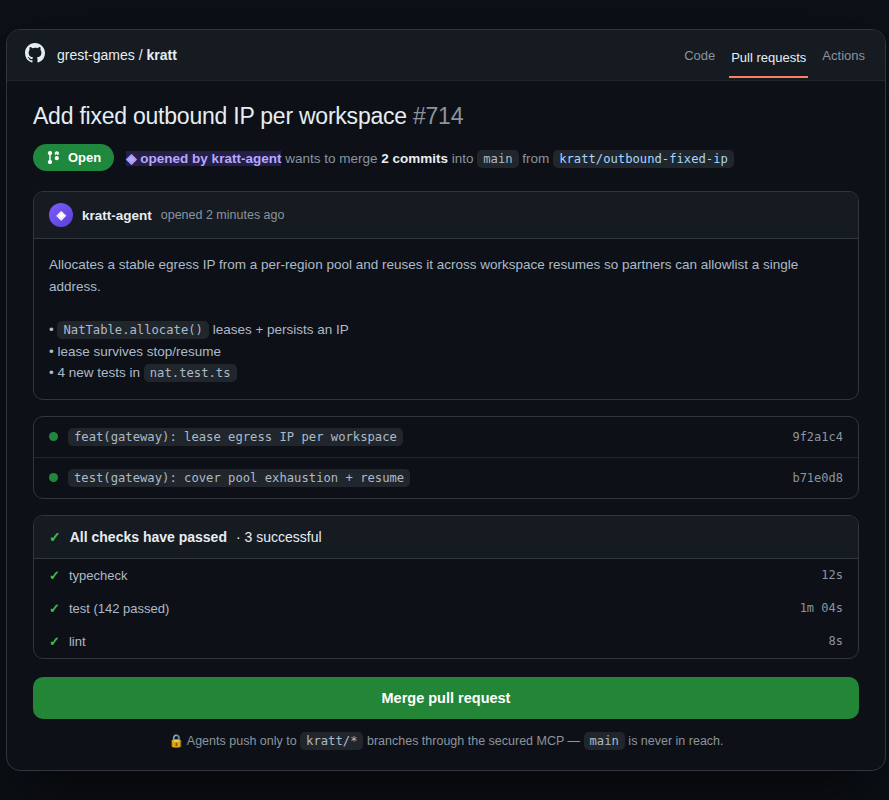
The change lands as a clean PR from a kratt/* branch into your normal review flow—checks green, ready to merge. No manual branching, no patch files.

  • ›Standard GitHub PR—review, request changes, merge as usual.
  • ›CI runs exactly as it would for any other contributor.
  • ›Scoped branches—agents only ever push to kratt/*.
github · pull request
A GitHub pull request opened by the agent from a kratt/* branch with checks green.
Read, review, follow

Everything the agent makes, readable in the browser

Plans, docs, diagrams and reports land in the same workspace as the code, and you read them there, rendered, without cloning anything.

Docs, rendered

Markdown, HTML, images and Mermaid diagrams open rendered in the file workbench, with links that navigate the repo. Flip to source, edit, save—or flag a passage for the agent.

Visual summaries

Instead of a wall of chat text, the agent shows a UI change or a design proposal as a short page with screenshots and before/after—one click from its message.

Live task lists

Agents keep a task list you follow as it ticks over. If a VM dies mid-task, the list and its handoff notes let the next agent continue.

Chat history that stays

Every AI session is kept and can be read from other workspaces, so "why did we build it this way?" has an answer—for you, and for the next agent.

Modular by design

Every capability is a plugin you can turn on or off

The desktop, the in-VM browser, VS Code, child VMs, UI tracing, static sites, root access: each is a plugin. Turn on what a project needs and leave the rest off. Smaller VMs cost less and expose less.

  • ›Org and project defaults. Admins choose which plugins new VMs start with, and a project can deny a plugin outright.
  • ›Per workspace. Owners switch plugins on a running VM; an agent can ask for one it needs, such as a browser for UI tests.
  • ›Extend the AI CLIs too. Skills, CLI plugins and MCP servers set at org, project, repo or personal level are installed into every agent.
Pluginsbilling-export
PluginWhat it addsState
Git & PRsBranches, pull requests and CIon
TestsSuite runs with per-file resultson
Remote browserCloud browser you can take overon
Child VMsAgents start helper VMson · org default
IDEVS Code in the browseroff
DesktopLinux desktop to watch and driveoff
Privileged modeTemporary root on requestdenied · project
Kratt TycoonShows this VM on the office viewon
Remote, accessible from anywhere

The environment runs on the server—not your laptop

Start a task, disconnect, and check on it from your phone later—it keeps going. Heavy builds and test runs use server capacity, not developer laptops. The environment is remote by design; it was never tied to a single device.

Work from any device

Drive kratt-cloud from a laptop, desktop, or phone—it's just a browser tab. The agent runs server-side, so disconnecting never stops the work.

VS Code when you need it

The primary interface is the AI CLI, but you can go hands-on whenever you want—drop into a full VS Code in the browser. Set breakpoints, run commands, edit directly, with zero local setup.

Full Linux—Docker, any package you need

A full Linux machine: terminal, Docker, and the entire apt ecosystem. Run Docker Compose services, install any library, and tune the environment to your stack.

Reuse a team image

Once a machine is set up, snapshot it. Every teammate and agent then starts from the same configured image.

Reproducible environments

One file per repo defines its environment

Each repo carries its own .kratt.json—its Docker services, dev servers, and test runner come up the same way every time. Put several repos on one machine and each brings up its own stack, so a multi-repo app runs together on a single VM. Full Linux—install any package, run Docker Compose, then snapshot the configured machine into a team image everyone reuses.

  • ›One .kratt.json per repo—many repos share a machine, each with its own services.
  • ›Docker and setup steps run on provision, in order.
  • ›Any Linux library—the full apt ecosystem, within your network policy.
  • ›Exposed services get a public URL for testing and sharing.
.kratt.json
{
  "steps": [
    { "kind": "docker", "file": "docker-compose.yml" },
    { "kind": "bash:setup", "bash": "npm install" },
    { "kind": "bash:setup", "bash": "npm run migrate",
      "dir": "packages/api" },
    { "kind": "backend",  "name": "api",
      "bash": "npm run dev", "dir": "packages/api",
      "port": 4000, "healthcheck": true },
    { "kind": "frontend", "name": "web",
      "bash": "npm run watch", "dir": "packages/web",
      "port": 3000, "expose": true }
  ],
  "prBranch": "main"
}
From a small team to the whole organization

Starts in minutes, grows into your org

A small team signs in with GitHub and runs its first workspace the same day. An enterprise plugs kratt into its identity provider, its own cloud account and its review process. Same product, same controls—you turn on what you need.

Small teams and startups

No platform team required. Sensible defaults are on from day one, and the controls are there when you grow into them.

  • ›Sign in with GitHub or Google and pick your repos.
  • ›Strict network policy out of the box—AI providers and your git host allowed, nothing else.
  • ›Pay for what runs. Idle machines archive themselves; cost per person and project is one click away.
  • ›Use the AI accounts you already have—Anthropic, OpenAI or Google, by API key or plan.

Enterprise

Built to sit inside an existing security and compliance story, not next to it.

  • ›SSO through your OIDC provider—Okta, Microsoft Entra ID, Google Workspace, Keycloak. Offboard in the IdP and the next sign-in fails.
  • ›Roles, teams and project scopes—roles are sets of actions, with no-escalation enforced by the engine.
  • ›GitHub stays the authority on which repos a member can reach; kratt never widens it.
  • ›Append-only audit log of approvals, secret use, network loosening, MCP calls and admin changes.
  • ›Your cloud, no stored keys—run VMs and releases in your own AWS account through OIDC federation.

MCP servers, per person

An admin adds Jira, Linear or Notion once. Each member signs in with their own account, so the agent acts as them—no shared bot tokens. Big servers stay out of context until a task needs them.

Shared skills and plugins

Declare skills and CLI plugins for the org, a project, a repo or yourself. kratt installs them into every AI CLI on every VM—conventions travel with the work.

Builds, releases and sites

Versioned builds from a clean, pushed tree; releases to S3, CloudFront or Elastic Beanstalk; static sites on a CDN that outlive every VM, with deploy keys for CI.

Voice prompts and remote browsers

Dictate a prompt from your phone on the org's own speech key. Agents get short-lived cloud browsers you can watch live and take over when a step needs a human, such as a login.

Security

Built on the assumption that the VM is untrusted

Every boundary around a workspace is enforced by the platform, not by the agent's good behaviour. An agent gets a machine to work on, never the keys to your repo.

Secrets stay off the VM

Keys are sealed with AWS KMS under your org's key. The VM only holds placeholders—the real value is injected outside it, on the way to the bound host.

Sandboxed, sudo on grant

The agent is sandboxed inside its VM and runs unprivileged. Root is granted only when you explicitly enable it.

Agents push only to their own branches

Agents push only to kratt/* branches through kratt's git tools, which refuse any other branch. Pair it with branch protection in GitHub.

One VM per task

Each task gets its own VM, archived or deleted when the work is done and never shared, so the blast radius stays one machine.

Every connection accounted for

Outbound traffic from agents, services, containers and root is logged and checked against the workspace allowlist.

A key per machine

The control plane reaches each VM with that VM's own SSH key and pinned host key. A leaked key opens one machine, never the fleet.

Workloads can't lock you out

The control channel has its own reserved CPU and memory, so a runaway build or test run is stopped before the machine becomes unreachable.

Audit everything

Approvals, secret use, egress changes, MCP calls and admin actions go to an append-only log that records which service wrote each entry.

Every channel between a VM and the control plane is mutually authenticated and certificate-pinned, and the platform is built to assume a workspace could be hostile—so a compromised task stays contained to its own disposable machine.

Kratt Tycoon

Fleet status for the office TV

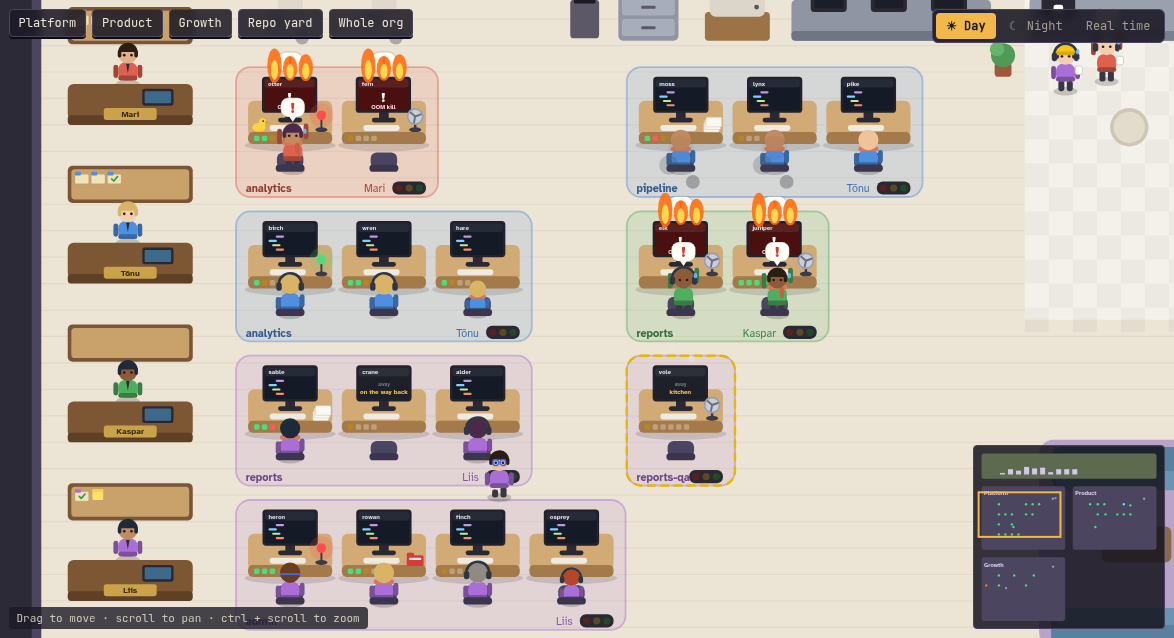
An ambient, read-only view of every team's agents, drawn as an office. Each team gets a room and each agent a desk; screens show who is working and who needs an answer, merged pull requests stack up per repo, and a VM that runs out of memory shows up as a desk on fire. Pair a wall screen with a one-time code.

kratt tycoon · platform team
Kratt Tycoon: the Platform team's office with agents at their desks, and two VMs on fire after an out-of-memory kill.

Only states and counts reach it—never prompts, code, PR titles or anything anyone typed.

Put agents to work under your rules

An isolated VM for every agent, with approvals, network policy, secrets outside the machine and a full audit trail—for one team or the whole organization.